AI & Automation
How to Automate Med Spa Cancellation Waitlists Without Chaos
Learn how to automate med spa cancellation waitlists with clear rules, compliant messaging, booking controls, and workflows that refill open slots fast.
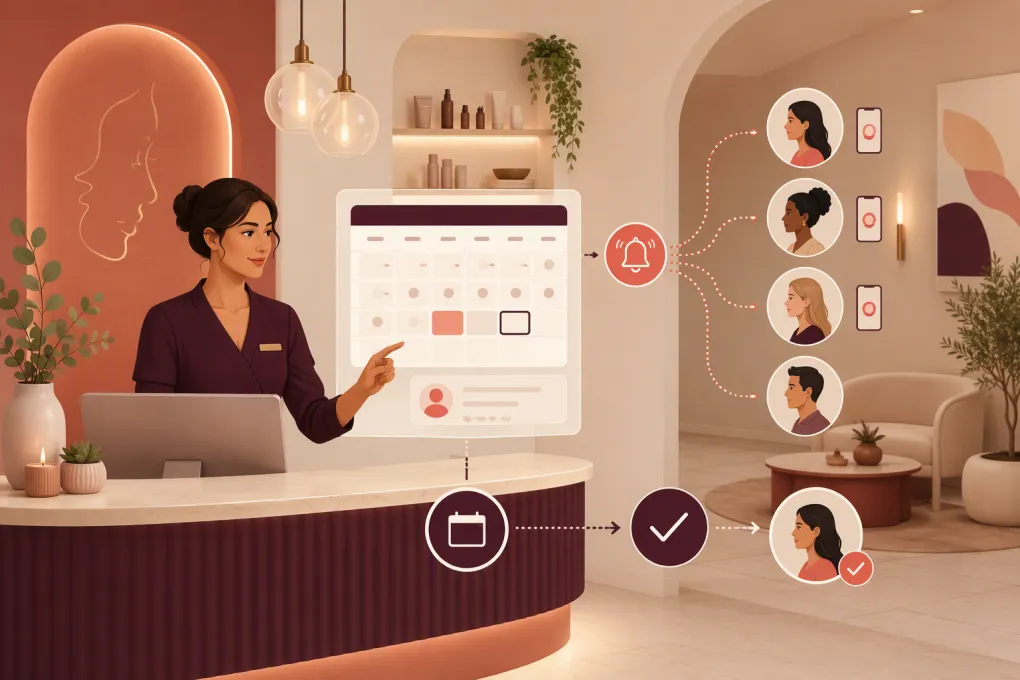 Watch · 20s
A canceled med spa appointment is not just an empty square on the calendar. It can mean unused provider time, an idle treatment room, wasted preparation, and a client who would have taken the opening if they had known about it.
The usual response—calling people one by one—is slow and inconsistent. Front-desk staff may be checking voicemail, serving clients, confirming tomorrow’s schedule, and handling intake at the same time. By the time someone reaches the right candidate, the opening may be too close to fill.
Automation fixes the communication delay, but only if the workflow respects treatment eligibility, provider requirements, client consent, booking rules, and payment policies. A mass text to every client is not a waitlist strategy.
See how Fitty can follow up with med spa clients and help book openings 24/7 →
Start With a Structured Waitlist
Automation cannot make reliable decisions from a note that says “call Sarah if something opens.” Your waitlist needs structured information that a person or system can use to match clients with appointments.
At minimum, capture:
- Requested service or treatment category
- Preferred provider, if any
- Acceptable dates and time ranges
- Location for multi-location businesses
- Earliest arrival time or minimum notice needed
- Whether the client has completed a consultation
- Relevant booking prerequisites
- Deposit or card-on-file status
- Preferred communication channel
- Consent and messaging status
- Date the waitlist request expires
Avoid putting unnecessary clinical details into ordinary notes or text messages. The scheduling record should contain only what is needed to determine whether the client can book. Clinical screening and protected information belong in the appropriate secure system.
Separate Waitlists by Appointment Type
Not every opening is interchangeable. A consultation, injectable appointment, laser session, facial, and body treatment may require different providers, rooms, equipment, durations, or prerequisites.
Build separate eligibility groups such as:
- New-client consultations
- Existing-client treatment appointments
- Provider-specific requests
- Device- or room-dependent services
- Follow-up appointments
- Multi-session treatment visits
This prevents the automation from offering a slot to someone who cannot actually use it.
Define the Cancellation Trigger
The workflow should begin when an appointment is genuinely available—not simply when someone asks to cancel.
A clean trigger sequence looks like this:
- The appointment is canceled in the scheduling system.
- Any required staff review takes place.
- The slot is marked available for waitlist outreach.
- Eligible clients are identified using service, provider, location, duration, and timing rules.
- The first offer is sent.
- The slot is reserved or booked according to your response rules.
- Outreach stops as soon as the appointment is taken.
Staff review may still be appropriate for complex treatments, provider changes, unusually long appointments, or clients who need additional clearance. Automation should remove repetitive work, not bypass professional judgment.
Choose How the Opening Will Be Offered
There are three practical ways to release canceled appointments.
Sequential Offers
Offer the opening to one client at a time. Give each person a defined response window before moving to the next candidate.
This method is controlled and feels personal, but it can be too slow for same-day cancellations. It works best when the opening is several days away or when demand is high enough that the first few candidates are likely to accept.
Small-Batch Offers
Notify a limited group and let the first eligible client complete the booking.
This is faster, but your booking system must prevent two people from claiming the same slot. The message should clearly say that availability is first confirmed, first booked—not guaranteed merely because the client replied.
Broadcast Offers
Send the opening to a larger eligible segment. This can work for urgent, same-day availability, but it should not become the default. Excessive alerts train clients to ignore your messages and can make the experience feel indiscriminate.
For most med spas, a tiered approach is more useful: sequential outreach for future openings, small batches for next-day availability, and carefully targeted broadcasts for same-day gaps.
Build the Matching Rules
The matching logic is the core of the automation. Start with hard requirements, then use preferences to rank the eligible clients.
Hard Requirements
A client should not receive an offer unless the appointment matches required conditions, including:
- Correct service and appointment duration
- Qualified provider
- Appropriate location and room
- Required consultation or intake status
- Valid timing between treatment sessions, where applicable
- Required booking or payment status
- Enough notice for the client to arrive
Ranking Preferences
After filtering for eligibility, rank candidates using operationally useful factors:
- Requested date and time fit
- Provider preference
- Time already spent on the waitlist
- Flexibility noted by the client
- Previous response to waitlist offers
- Ability to accept short-notice appointments
Document these rules. Staff should be able to explain why a client did or did not receive an offer without guessing.
Write Messages That Lead to a Clear Action
A waitlist message needs to answer five questions immediately:
- What service is available?
- When and where is it?
- Who is the provider, if relevant?
- How long does the client have to respond?
- What action confirms the booking?
A practical template might read:
An opening is available for your requested service on Tuesday at 2:30 p.m. at our Midtown location. Reply YES to request it or use this secure booking link. The appointment is not confirmed until you receive a confirmation message.
Do not include sensitive treatment information if the communication channel or client consent does not support it. Use neutral language when necessary, then direct the client to a secure booking page or authenticated conversation.
Give clients simple reply options such as YES, PASS, or STOP. Free-form replies like “Could I do 20 minutes later?” should route to an AI receptionist or staff member rather than stalling the workflow.
See how Fitty can answer booking questions while your front desk stays focused on clients →
Prevent Double-Booking and Stale Offers
The most damaging waitlist mistake is confirming the same opening for two clients. Your system needs a single source of truth and explicit slot-control rules.
Use one of these approaches:
- Direct booking: The first client to complete the booking gets the slot.
- Temporary hold: A qualified client receives a short hold while completing required steps.
- Staff confirmation: The client requests the opening, but staff approves the final booking.
Whichever method you choose, define what releases the slot. A reply without completed intake, required authorization, or an applicable deposit may not be enough.
Every offer also needs an expiration. When the window closes, send a brief message that the opening has been released, then move to the next candidate. Once booked, immediately stop all pending outreach and tell other respondents that the appointment is no longer available.
Connect Deposits, Forms, and Confirmations
Refilling the appointment is only half the workflow. The client may still need to complete forms, acknowledge policies, provide a card, or satisfy your normal booking requirements.
A complete automation should:
- Confirm the selected appointment.
- Send the correct intake or consent workflow.
- Request any payment step required by your policy.
- Add the appointment to the live schedule.
- Send reminders using the same rules as a standard booking.
- Alert staff if a required step remains incomplete.
Do not create a special, looser process for waitlist clients. A last-minute booking should still follow your documented cancellation, deposit, intake, and confirmation policies.
Use AI for Conversations, Not Just Notifications
Traditional waitlist automations send a message and wait for a specific reply. Real clients ask questions:
- “Can I see a different provider?”
- “How long will the appointment take?”
- “Can I move my appointment instead of adding another?”
- “Does this opening work for a consultation?”
- “Can I book at the other location?”
An AI receptionist can handle routine scheduling questions, check defined availability, continue follow-up, and escalate exceptions. That matters after hours, when an opening may appear but no staff member is available to work the list.
Fitty, WTF Go’s AI receptionist, is designed to answer leads, book appointments or classes, and follow up around the clock. For cancellation workflows, that means the conversation can continue beyond a one-way alert instead of sitting unanswered until the front desk returns.
Explore how WTF Go and Fitty can turn cancellations into bookable conversations →
Add Compliance and Consent Guardrails
Waitlist automation involves messaging and potentially sensitive client information. Review the workflow with qualified legal and compliance advisers for your business and jurisdiction.
Operational safeguards should include:
- Recording the client’s communication consent
- Honoring opt-outs promptly
- Separating transactional scheduling messages from marketing campaigns
- Limiting sensitive information in texts and emails
- Using secure systems for protected or clinical information
- Confirming whether vendors will sign required agreements, including a business associate agreement when applicable
- Setting role-based access for staff
- Keeping an audit trail of offers, replies, bookings, and overrides
Do not assume that consent to receive appointment reminders automatically covers every promotional campaign. Keep the purpose of each message clear.
Test Before Turning It On
Run the workflow with internal test profiles before sending live offers. Test at least these scenarios:
- One client accepts immediately.
- Two clients respond at nearly the same time.
- The first client fails to complete a required step.
- The client asks an unexpected question.
- The opening is manually booked by staff during outreach.
- The provider or room changes.
- The client has opted out of text messaging.
- No one accepts before the appointment time.
Then monitor a small set of operational measures: canceled slots offered, slots successfully rebooked, time from cancellation to booking, failed matches, staff interventions, opt-outs, and duplicate-booking incidents. These are your own business metrics; use them to refine timing and rules rather than relying on a generic benchmark.
Keep a Human Override
A well-designed waitlist is automated but not unattended. Staff need a clear way to pause outreach, remove a client, change eligibility, reserve an appointment, and review conversations.
Assign ownership for exceptions. If everyone assumes someone else is watching the queue, unresolved replies and booking conflicts will accumulate.
The goal is a controlled system: the software handles matching, outreach, routine questions, and follow-up, while your team steps in for clinical judgment, unusual requests, and sensitive client situations. That is how med spas refill cancellations without turning the front desk into a call center.
Frequently asked questions
What information should a med spa cancellation waitlist collect?
Collect the requested service, acceptable dates and times, provider and location preferences, minimum notice, booking prerequisites, communication consent, and an expiration date. Keep unnecessary clinical details out of ordinary scheduling notes.
Should a canceled appointment be offered to everyone at once?
Usually not. Sequential or small-batch offers create more control, while a carefully targeted broadcast may be appropriate for urgent same-day openings.
How do you stop two waitlist clients from booking the same slot?
Use a live booking system with direct booking, a temporary hold, or staff confirmation. Outreach must stop immediately when the appointment is reserved or confirmed.
Can AI manage med spa waitlist replies after hours?
Yes, if the AI is connected to defined scheduling rules and availability. It should answer routine questions, support booking, and escalate clinical or unusual requests to staff.
Are med spa waitlist texts subject to consent requirements?
Yes. Record consent, honor opt-outs, distinguish scheduling messages from marketing, and avoid exposing sensitive information. Consult qualified counsel about federal and state requirements for your specific workflow.
Keep reading



Run your gym on autopilot with WTF Go
Fitty — your AI receptionist — answers calls and DMs, fills classes, follows up with every lead, and collects dues while you coach.