AI & Automation
How to Automate Gym Trial Follow-Up Without Lead Leaks
Learn how to automate gym trial follow-up with exact triggers, timing, branches, staff handoffs, stop rules, and a complete workflow to implement today.
 Watch · 20s
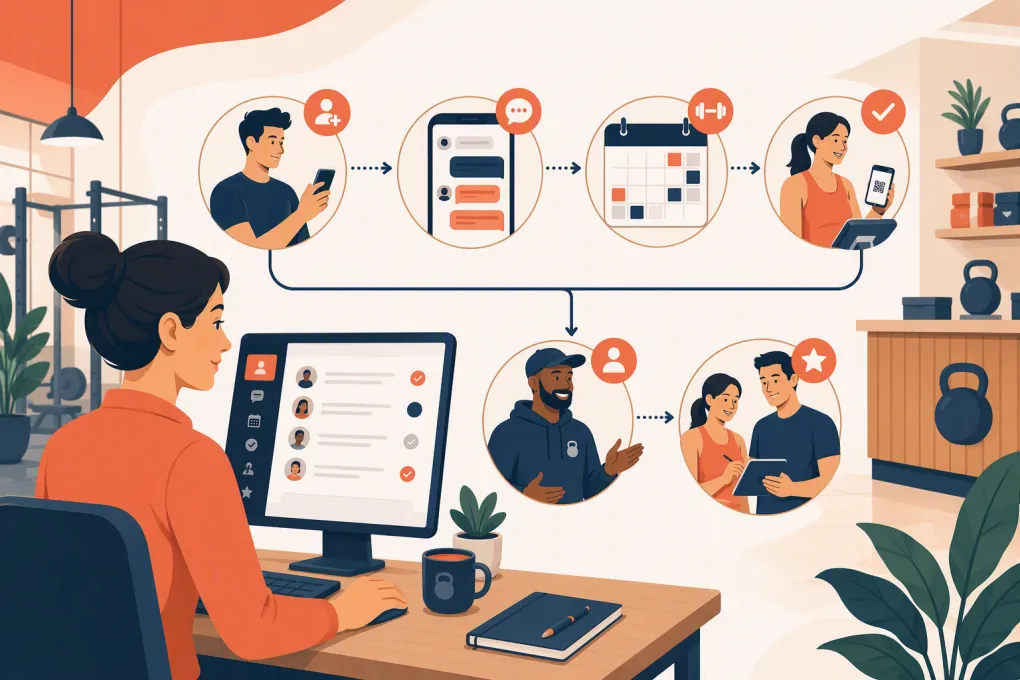
A gym trial rarely dies because the prospect suddenly stopped caring about fitness. More often, the lead arrived while the coach was on the floor, the booking link went unanswered, or nobody followed up after the trial.
Automation fixes those gaps only when it reacts to real behavior. A fixed series of “just checking in” messages is not a trial workflow. A useful system knows whether the prospect booked, completed a waiver, attended, no-showed, replied, joined, or asked for a person—and changes course accordingly.
Below is a practical framework, including an exact example you can adapt to your gym. The timing is a starting point, not a universal rule. Adjust it for your sales cycle, staffed hours, trial type, and communication permissions.
See how Fitty can handle trial inquiries when your staff is coaching →
Define the trial journey before automating it
“Trial lead” is too broad to drive useful automation. A person who submitted a form needs a different message from someone who booked tomorrow’s class or completed an intro session an hour ago.
Use clear lifecycle statuses:
- New inquiry: Contact details received, but no meaningful response yet.
- Engaged: The prospect replied or spoke with the team.
- Trial not booked: Interest confirmed, but no date is scheduled.
- Trial booked: A class, consultation, or intro session is confirmed.
- Trial attended: Attendance was recorded.
- Canceled or no-showed: The booking did not result in attendance.
- Joined: A membership or intended next-step offer was purchased.
- Closed or opted out: Sales follow-up must stop.
For gyms, “trial attended” should come from check-in or attendance data—not from whether a reminder was delivered. Coaches also need a simple way to correct attendance when someone arrives late, uses a different name, or is checked in manually.
Capture the fields your workflow needs
Automation cannot personalize or route a lead using data you never collected. At minimum, maintain these fields in your CRM or operating system:
- First and last name
- Mobile number and email address
- Communication consent and source
- Lead source and campaign
- Trial offer claimed
- Preferred location
- Training interest or goal category
- Preferred days or times
- Assigned staff owner
- Lifecycle status
- Scheduled class or appointment
- Booking, cancellation, and attendance timestamps
- Waiver status, if required before participation
- Last inbound and outbound message timestamps
- Membership or purchase status
- Opt-out status
Do not turn your form into an interrogation. Collect name, contact information, location, and one useful qualifying detail first. Fit questions such as training experience, goals, and schedule into the conversation.
For a multi-location business, location is operationally critical. It controls the correct timetable, address, parking instructions, coach notification, and local staff owner.
Use trigger-condition-action logic
Every automation should be understandable as three parts:
- Trigger: Something happened, such as a form submission or check-in.
- Condition: The system checks what is currently true.
- Action: It sends a message, updates a status, creates a task, or waits.
Here is a gym-specific trigger map:
| Trigger | Conditions checked | Action |
|---|---|---|
| Trial form submitted | Valid contact method, not opted out, not already a member | Create lead, assign location, send first response |
| Prospect replies | No open human handoff; answer is within approved scope | Respond, qualify, or offer appropriate trial slots |
| Trial booked | Booking is active | Stop unbooked sequence; send confirmation |
| Trial is 24 hours away | Still booked; reminder permitted | Send preparation and rescheduling message |
| Trial is 2 hours away | Still booked; no recent cancellation | Send short arrival reminder |
| Booking canceled | No replacement booking exists | Offer rescheduling options |
| Attendance recorded | No membership purchase recorded | Launch attended-trial follow-up |
| Class ends without check-in | Booking still marked active | Wait for attendance reconciliation, then start no-show branch |
| Membership purchased | Lead is in any trial-sales sequence | Stop sales messages and start onboarding |
| Prospect opts out | Any active status | Suppress applicable automated outreach immediately |
Your software may connect these events natively or through an API, webhook, or third-party automation connector. Whichever method you use, verify that updates move in both directions where needed. A booking created in the scheduling system must update the lead record quickly enough to prevent an irrelevant follow-up.
Complete example: free first-class follow-up workflow
This example is for a gym offering a free first class. It assumes the gym collects appropriate communication permission and that class booking, attendance, messaging, and membership status are available to the automation.
1. New inquiry: immediate response
Trigger: Free-class form submitted.
Delay: Send immediately after successful submission.
Conditions: Contact is not an active member, duplicate lead, or opted-out record.
Actions:
- Create or update the lead.
- Set status to New inquiry.
- Assign the location based on the selected club or ZIP-code routing rule.
- Assign the sales owner for that location.
- Send: “Hi [First Name], this is [Gym Name]. I can help you choose your first class. Are you looking for strength, conditioning, or a mix?”
Fallback: If the message fails, create a staff task due within the next staffed sales block. If no valid mobile number exists, use the permitted email path instead.
2. No reply: first follow-up
Delay: Wait 2 hours.
Conditions: No reply, no booking, no purchase, and no opt-out.
Action: Send one practical prompt:
If you are new to group training, we can recommend a beginner-friendly first session. Do weekdays or weekends work better?
If the inquiry arrived overnight, hold this follow-up until the gym’s approved messaging window. The initial acknowledgment can still be automated if your consent and messaging setup allow it.
3. Still unbooked: schedule-focused follow-up
Delay: Wait until the next day, ideally during the prospect’s likely planning window rather than at an arbitrary early hour.
Conditions: No reply or booking.
Action: Offer a direct booking link or two suitable class options. Do not offer a class that is full, advanced-only, or inappropriate for first-time visitors.
Owner: Automation remains responsible unless the prospect asks a question it cannot answer.
4. Final active attempt
Delay: Wait 2 additional days.
Conditions: Still unbooked, no inbound response, no opt-out.
Action: Send a low-pressure close-the-loop message:
Hi [First Name], would you still like help booking your first class? Reply with a preferred day, or let us know if now is not the right time.
After this message, remove the lead from the active trial sequence. You may place the record into a separate long-term nurture program only if that communication matches the person’s consent and your policies.
5. Booking branch
Trigger: Trial booking created at any point.
Immediate stop conditions: Cancel every pending unbooked-lead message.
Actions:
- Set status to Trial booked.
- Send the class date, start time, location, arrival lead time, what to bring, and rescheduling path.
- Include waiver instructions if the waiver can be completed before arrival.
- Notify the coach or front desk through the team’s normal task queue.
Reminder timing: Send one reminder roughly 24 hours before the class and a short reminder about 2 hours before it. If the booking is made less than 24 hours ahead, skip the first reminder. If it is made close to class time, rely on the confirmation instead of stacking messages.
6. Cancellation and no-show branches
Cancellation trigger: Booking status changes to canceled.
Action: Wait 15 minutes in case the prospect is actively rebooking. If no replacement exists, offer new times.
No-show trigger: Class has ended and attendance is still absent.
Delay: Allow 30–60 minutes for the coach or front desk to reconcile check-ins.
Action: Send a neutral rescheduling message. Create a staff task if the lead no-shows twice, because another automated booking link is unlikely to uncover the actual barrier.
7. Attended-trial branch
Trigger: Attendance is confirmed.
Delay: Send the first check-in 1–2 hours after class, not while the prospect is still changing or speaking with the coach.
Action: Ask about the experience and provide the intended next step:
Thanks for training with us, [First Name]. How did the class feel? If you have questions about continuing, reply here and we’ll help.
Staff task: Assign the attending coach or membership advisor a personal follow-up due by the next staffed day. Include the class attended, coach notes, goals, and any questions from the conversation.
Second follow-up: If there is no reply or purchase, send one useful message the next day explaining the relevant membership path or inviting a short consultation.
Final follow-up: If the person remains undecided, send a close-the-loop message 2–3 days later. Avoid fake deadlines. Mention an expiration date only when the offer genuinely has one.
8. Global stop and escalation rules
Stop all trial-sales messages immediately when:
- A qualifying membership is purchased
- The prospect opts out
- Staff marks the lead closed
- The contact is identified as an existing member
- A complaint or sensitive issue requires human handling
Pause automation and assign a person when the prospect asks about an injury, requests an exception, disputes a charge, reports a poor experience, or asks to speak with staff. Set an owner and due time; a generic notification is not a handoff.
Where Fitty fits into the workflow
Fitty is WTF Go’s AI receptionist and agent for handling leads, booking classes, following up, and collecting dues around the clock. In a trial workflow, it can cover the conversational layer: answering common questions, identifying the right next step, helping a prospect book, and continuing follow-up when staff are coaching or the front desk is closed.
Exact behavior depends on how your offers, schedules, payment rules, permissions, and escalation paths are configured. Before launch, confirm which booking and payment actions Fitty will perform for your setup, what system owns each record, and when a human takes over.
Explore how WTF Go and Fitty can run your trial follow-up path →
Test before sending real leads through it
Create test contacts and run every branch:
- New inquiry with no reply
- Reply followed by booking
- Booking made shortly before class
- Cancellation and immediate rebooking
- No-show with delayed attendance entry
- Trial attendance followed by purchase
- Existing member submitting a trial form
- Failed text or invalid email
- Human handoff
- Opt-out
Check the prospect experience and the staff experience. Confirm that messages stop, tasks have owners, links open the correct location, and times display in the gym’s local time zone.
Then review funnel movement by location, offer, and source: inquiry to contact, contact to booking, booking to attendance, and attendance to membership. Read conversation transcripts alongside the funnel. They will reveal whether prospects are confused about class level, parking, childcare, pricing, waivers, or what happens after the trial.
The best trial automation does not replace your coaches’ judgment. It makes sure they enter the conversation at the moment their judgment matters.
Frequently asked questions
How soon should a gym follow up with a trial lead?
Send the initial acknowledgment immediately, then consider a useful follow-up about two hours later and another the next day if the prospect has not replied or booked. Adjust timing for consent, approved messaging windows, and staffed hours.
How many automated trial follow-ups should a gym send?
A practical starting point is an immediate response followed by two or three value-adding attempts over several days. Stop when the person replies, books, joins, opts out, or needs a staff handoff.
What data is required to automate gym trial follow-up?
At minimum, capture contact details, consent, lead source, location, trial offer, booking status, attendance, membership status, staff owner, and opt-out status.
Should a no-show receive the same follow-up as someone who attended?
No. Attendees should receive experience and membership follow-up, while no-shows should receive a neutral rescheduling path after attendance records have been reconciled.
Can Fitty book gym trials and handle follow-up?
Fitty is designed to answer leads, book classes, follow up, and collect dues. Confirm the exact workflow, connected records, rules, and escalation settings required for your gym before launch.
Keep reading



Run your gym on autopilot with WTF Go
Fitty — your AI receptionist — answers calls and DMs, fills classes, follows up with every lead, and collects dues while you coach.