AI & Automation
How to Automate Gym Guest Pass Follow-Up for More Sales
Learn how to automate gym guest pass follow up with faster replies, timed texts, staff tasks, no-show recovery, and clear conversion tracking that works.
 Watch · 20s
A guest pass lead is usually deciding between several options: visit now, visit later, try another gym, or do nothing. If your response arrives hours later—or depends on a salesperson remembering to call—the easiest choice is often doing nothing.
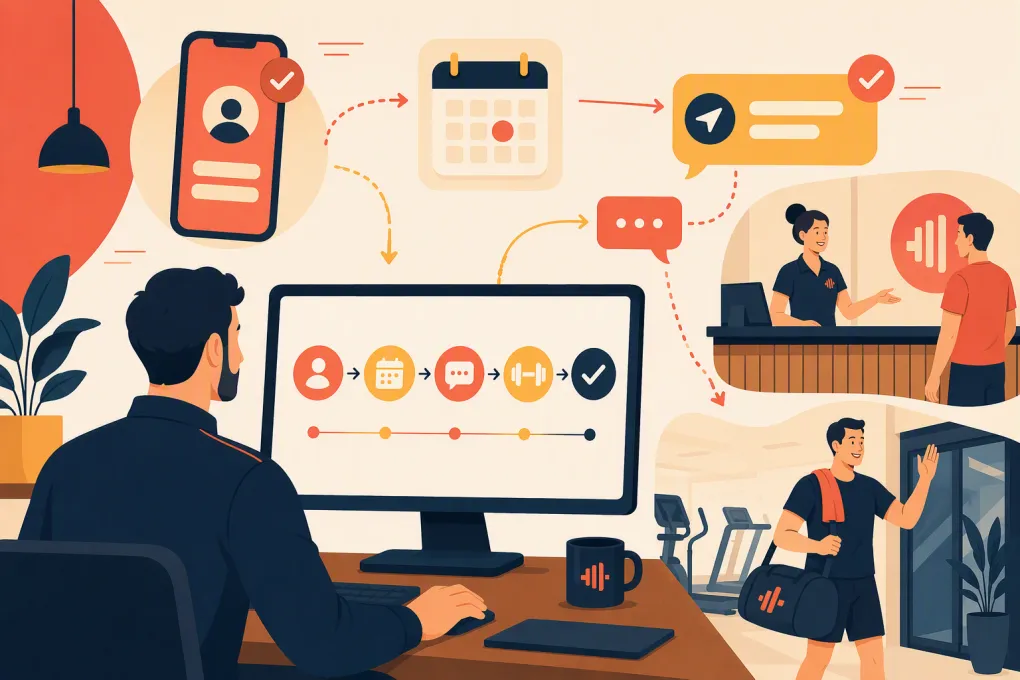
Automating guest pass follow-up solves the speed and consistency problem. It does not mean blasting every lead with the same promotional sequence. A good system responds immediately, helps the prospect schedule a visit, adjusts based on what they do, and brings staff into the conversation when human judgment matters.
Here is how to build that system without creating more administrative work for your team.
What gym guest pass automation should accomplish
The goal is not simply to send more messages. Your workflow should move each prospect toward a clear next step while keeping your lead records accurate.
A useful guest pass system should:
- Confirm that the request was received
- Answer common questions about hours, classes, amenities and policies
- Encourage the lead to schedule a specific visit
- Send reminders before the visit
- Detect and recover missed appointments
- Trigger different follow-up after an attended visit
- Assign staff tasks when personal outreach is needed
- Stop sales messages after a purchase, opt-out or disqualification
- Track which campaigns and lead sources produce visits and memberships
The operational problem is that many gyms split these jobs across a form tool, inbox, calendar, CRM and staff checklist. That creates delays and incomplete records.
See how Fitty handles guest pass inquiries and booking conversations 24/7 →
Start with a clear guest pass pipeline
Do not automate an undefined process. First, decide which stages a guest pass lead can occupy and what event moves the person forward.
A practical pipeline looks like this:
| Stage | Entry condition | Primary next action |
|---|---|---|
| New inquiry | Form, call, chat or ad lead received | Start conversation |
| Contacted | First message or call completed | Get a reply or booking |
| Visit scheduled | Date and time confirmed | Prepare and remind |
| No-show | Scheduled time passes without check-in | Reschedule |
| Visited | Guest checks in | Discuss goals and membership |
| Joined | Membership purchased | Stop prospect sequence |
| Nurture | Interested but not ready | Continue lower-frequency follow-up |
| Closed | Opted out, invalid or not a fit | End outreach |
Keep the lead stage separate from the pass status. A pass might be issued, redeemed or expired, while the person remains an active sales opportunity. Combining those concepts makes reporting unreliable.
At minimum, capture these fields:
- First and last name
- Mobile number and email
- Preferred location
- Lead source and campaign
- Requested pass or offer
- Fitness goal or service interest
- Preferred visit date
- Assigned staff member
- Consent status and timestamp
- Latest inbound and outbound activity
- Scheduled, attended and purchase dates
Use a unique contact record whenever possible. Duplicate records can cause prospects to receive overlapping messages from different campaigns.
Build the automated follow-up sequence
The best timing depends on your staffing model, sales cycle and operating hours. The sequence below is a practical starting point, not a rigid rule.
1. Respond as soon as the request arrives
The first message should confirm the inquiry and make replying easy. Avoid sending a long description of every amenity.
A useful opening text might be:
Hi {{first_name}}, this is {{business_name}}. I can help you set up your guest visit. Would you rather come in today or tomorrow?
That question is easier to answer than “How can we help?” If the lead requested a specific class or service, reference it directly.
Your automation should also:
- Create or update the CRM record
- Record the original source
- Route the lead to the correct location
- Check for an existing member or prior lead record
- Notify an owner if the inquiry needs special handling
If the request comes in by phone and nobody answers, the workflow should acknowledge the missed call and offer immediate assistance by text, subject to your consent and communication policies.
2. Continue the conversation, not just the campaign
Traditional automations send messages on a timer whether the prospect replies or not. That creates awkward experiences. A lead might ask about childcare and receive an unrelated “Are you still interested?” text minutes later.
Use branching logic that pauses scheduled messages when an inbound reply arrives. The system—or the assigned employee—should answer the question before returning to the booking objective.
An AI receptionist such as Fitty can handle common questions, identify the lead’s intent and offer available booking options outside staffed hours. Define clear escalation rules for pricing exceptions, medical questions, complaints and anything else that requires a manager.
3. Turn interest into a scheduled visit
“Stop by anytime” sounds flexible, but it creates weak commitment and makes it difficult to plan a proper tour. Ask the lead to choose a specific day and time.
Remove unnecessary friction from the booking process:
- Offer a small number of relevant appointment options
- Display times for the correct location and service
- Confirm the address, parking instructions and check-in process
- Explain what to bring
- Identify the staff member or coach they will meet
- Add the booking to the operating calendar
If walk-ins are allowed, still ask when the prospect expects to arrive. That gives your team an opportunity to prepare.
4. Send useful pre-visit reminders
A reminder should do more than repeat the appointment time. It should reduce uncertainty.
For example:
You’re booked for {{day}} at {{time}}. Check in at the front desk and ask for {{staff_name}}. Bring a photo ID and workout gear. Need a different time? Reply here and we’ll help.
Consider one reminder the day before and another closer to the appointment when appropriate. Avoid excessive reminders for a short sales appointment.
Create an internal staff task as well. The assigned employee should be able to see the lead’s goal, original offer, prior questions and scheduled visit without searching through separate inboxes.
5. Branch based on attendance
An attended visit and a no-show should never receive the same follow-up.
For a no-show, keep the tone neutral. Do not shame the prospect or assume they lost interest.
Hi {{first_name}}, we missed you today. Would you like me to find another time this week?
Include an easy rescheduling path. If the lead does not respond, make another attempt through an approved channel, then move the record into a lower-frequency nurture stage rather than sending daily reminders indefinitely.
For an attended visit, send a message that references what happened:
Thanks for visiting {{business_name}} today. Based on your goal of {{goal}}, would you like to review the membership options we discussed or schedule another conversation?
This message requires accurate check-in data. If attendance is not recorded consistently, your automation will fail at the most important branch.
See how WTF Go connects lead follow-up, scheduling and staff handoffs →
6. Stop or change the sequence at the right time
Every automated workflow needs exit conditions. Stop the guest pass sequence when someone:
- Purchases a membership or package
- Explicitly declines
- Opts out of messaging
- Provides invalid contact information
- Is marked as an existing member
- Enters another active sales process
Do not keep sending “ready to get started?” messages to someone who already joined. Purchase and billing events should update the contact record quickly enough to prevent that mistake.
Decide what AI handles and what staff handles
Automation works best when it removes repetitive coordination, not when it hides your team from prospects.
AI or rule-based automation can usually handle:
- Immediate acknowledgments
- Routine facility and schedule questions
- Appointment availability
- Booking and rescheduling
- Reminder delivery
- Basic lead qualification
- Follow-up status updates
Staff should take over for:
- Complex membership recommendations
- Corporate, family or negotiated arrangements
- Injury or medical concerns
- Complaints and sensitive situations
- High-intent leads asking detailed pricing questions
- Prospects who have visited but remain undecided
Set a response deadline for assigned tasks. A notification without ownership is not a handoff; it is another item everyone assumes someone else will handle.
Write messages that earn a response
Keep guest pass messages short and focused on one action. Good messages usually include:
- The prospect’s name
- Your business name
- The reason for the message
- One direct question
- A simple way to reschedule or opt out
Avoid false urgency. If a pass expires, state the real expiration date. Do not claim that spaces are almost gone unless availability is genuinely limited.
Also avoid leading with a discount. First determine what the prospect wants and whether your facility fits. Constant discounting can train leads to wait for the next offer rather than make a decision.
Protect consent and communication quality
Automated outreach still has to follow applicable calling and messaging rules. Your forms should clearly explain what the person is agreeing to receive, and your system should retain the consent source and timestamp.
Operational safeguards should include:
- Clear opt-out instructions
- Suppression of opted-out contacts
- Reasonable messaging hours based on the recipient’s location
- Separate handling for marketing and transactional messages
- Accurate business identification
- Review of federal, state and carrier requirements
Work with qualified legal counsel when setting your policies. Software can enforce rules, but it cannot decide which rules apply to your particular campaigns.
Measure the full guest pass funnel
Do not judge the workflow by message volume. Track movement through the pipeline.
Useful metrics include:
- Contact rate: leads who replied or spoke with staff divided by valid guest pass leads
- Booking rate: leads who scheduled a visit divided by valid leads
- Show rate: completed visits divided by scheduled visits
- Guest-to-member conversion: new members divided by completed guest visits
- Time to first response: time between inquiry and first meaningful reply
- Reschedule recovery: no-shows who later booked or attended
- Source performance: bookings, visits and memberships by campaign or channel
Review results by location, offer and lead source. A campaign can generate many pass requests while producing few actual visits. That may indicate weak targeting, confusing offer terms or poor follow-up—not necessarily a staff performance issue.
Launch the workflow without disrupting sales
Start with one location or one guest pass offer. Before going live, test these scenarios:
- A new lead books immediately.
- A lead asks a question before booking.
- An existing contact submits another form.
- A booked lead reschedules.
- A prospect does not attend.
- A visitor purchases on the same day.
- A contact opts out.
- A lead arrives outside staffed hours.
Read every message on a real phone, verify calendar time zones and confirm that staff tasks go to the correct owner. Then review live conversations regularly during the first few weeks.
WTF Go gives gyms and wellness businesses one operating system for lead conversations, booking and follow-up, while Fitty works as a 24/7 AI receptionist. That makes it easier to respond when intent is highest without asking employees to monitor every channel around the clock.
Explore an automated guest pass workflow with Fitty →
The right system should make the prospect’s next step obvious and the staff’s next task visible. Build around those two requirements, and automation becomes a practical sales process rather than another collection of scheduled texts.
Frequently asked questions
How quickly should a gym follow up with a guest pass lead?
Respond as soon as practical, ideally through an automated acknowledgment that can also help the lead book. Route complex questions to a staff member instead of leaving the prospect in a generic sequence.
Should guest pass follow-up use text, email or phone?
Use the channels the prospect consented to and is most likely to answer. Text is useful for short booking conversations, email can carry detailed instructions, and phone works well for complex or high-intent inquiries.
How many times should a gym follow up after a guest pass request?
There is no universal number. Use a short, purposeful sequence that changes based on replies, bookings, attendance and opt-outs rather than sending the same number of messages to every lead.
Can AI follow up with gym leads without staff involvement?
AI can answer routine questions, qualify interest, book visits and send reminders. Staff should take over for sensitive issues, complex recommendations, exceptions and prospects who need a personal sales conversation.
What should happen when a guest pass lead does not show up?
Send a neutral message that offers easy rescheduling, then make a limited number of additional attempts through approved channels. Move unresponsive prospects into lower-frequency nurture instead of continuing aggressive reminders.
Keep reading



Run your gym on autopilot with WTF Go
Fitty — your AI receptionist — answers calls and DMs, fills classes, follows up with every lead, and collects dues while you coach.