AI & Automation
How to Automate Gym Day Pass Sales: Complete Operator Guide
Learn how to automate gym day pass sales with trigger logic, payment and waiver flows, access rules, software criteria, message copy, and QA steps.
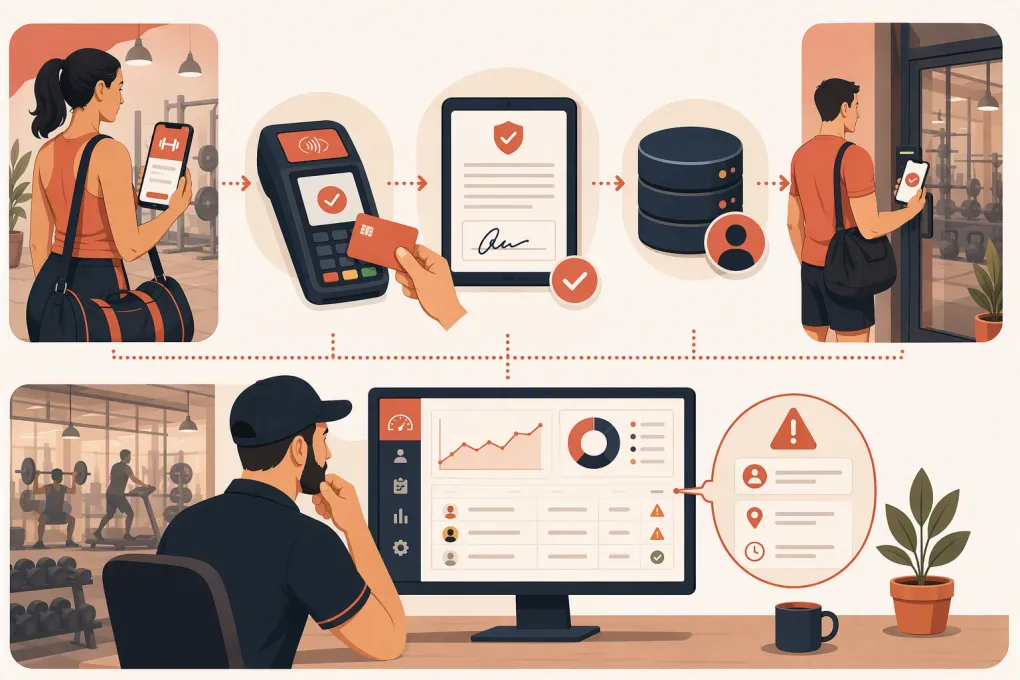 Watch · 20s
Automating day-pass sales is not the same as adding a “Buy Now” button. The sale is only automated when a prospect can get accurate answers, pay, sign the correct waiver, receive valid entry instructions, check in, and get appropriate follow-up without staff copying data between systems.
The difficult part is the handoff between payment, booking, waivers, customer records, and access control. If one system does not confirm the next step, the buyer may pay successfully and still end up locked outside.
This guide provides a reference implementation you can adapt. It is not evidence that every gym platform or door controller supports every connection described. Confirm available APIs, webhooks, credential controls, and data-export rights with each vendor before promising unattended access.
Define the product before building the automation
Write a one-page day-pass specification. This becomes the source of truth for your website, staff, AI receptionist, checkout, confirmation messages, and exception handling.
Document:
- Pass name and applicable location
- Price, taxes, and refund policy
- Purchase and activation windows
- Whether access is one entry, multiple entries, or valid for a defined period
- Staffed and unstaffed hours
- Included classes, equipment, locker rooms, and recovery amenities
- Minimum age and guardian requirements
- Identification and waiver requirements
- Local-resident, traveler, and repeat-purchase rules
- Access-failure and facility-closure procedures
Avoid vague rules such as “valid all day” if your door system needs exact timestamps. Define whether “day” means the facility’s operating day, a calendar date in the location’s time zone, or a rolling period beginning at first entry.
Use an event-based workflow
The cleanest setup uses events and statuses rather than time-based guesswork. A basic workflow looks like this:
Inquiry received
      |
      v
Pass selected --> Checkout started --> Payment failed --> Secure retry message
                                      |
                                      v
                               Payment confirmed
                                      |
                         Waiver status checked
                           /                 \
                    Incomplete             Complete
                        |                      |
                 Waiver reminder      Create customer/pass
                                               |
                                      Issue access credential
                                               |
                                  Send confirmation + instructions
                                               |
                                     Check-in event received
                                      /                    \
                                  No visit               Visited
                                     |                      |
                              Service follow-up     Membership follow-up
Each box should correspond to a system status you can view and audit. Do not infer “visited” from payment. Use a check-in, booking attendance, or access event when your systems support one.
Recommended records and identifiers
Use a stable customer ID across the workflow. Store the vendor transaction ID, waiver record ID, pass ID, location ID, and access credential ID against that customer where possible.
At minimum, retain:
- Customer name and contact details
- Consent status and timestamp
- Pass type, location, purchase time, and validity window
- Payment status and processor reference
- Waiver version, signature status, and signed timestamp
- Credential status and validity period
- Check-in or access event
- Refund, revocation, and staff-intervention history
This is what allows an operator to answer, “Did this person pay, sign, receive access, and enter?” without opening five disconnected systems.
Configure trigger logic explicitly
Automation should react to confirmed events. A practical trigger map might look like this:
| Trigger | Conditions | Automated action | Exception route |
|---|---|---|---|
| Day-pass inquiry received | Location and requested date known | Answer approved questions and send the correct checkout link | Route policy, accessibility, or unsupported requests to staff |
| Checkout abandoned | No completed payment; marketing consent permits contact | Send one service-oriented reminder with the same secure checkout link | Stop if the customer declines contact |
| Payment confirmed | Correct amount and location; transaction not flagged | Create or update customer and check waiver status | Hold issuance if records conflict |
| Waiver completed | Current waiver version; signer eligible | Create pass and request credential | Route minors or mismatched names for review |
| Credential issued | Validity matches purchased pass | Send entry instructions | Alert staff if issuance fails |
| First check-in recorded | Pass active and customer not already converted | Mark visited and start relevant follow-up | Flag duplicate or invalid entry events |
| Refund completed | Pass not used or approved exception | Revoke unused credential and record refund | Staff reviews used-pass disputes |
Use idempotency controls if your integration supports them. In plain terms, the same payment webhook should not create two passes or two door credentials when it is delivered twice.
Set safe credential rules
Temporary access deserves stricter rules than an ordinary confirmation email.
Configure the credential to:
- Work only at the purchased location
- Activate shortly before the valid visit window, not immediately for a future pass
- Expire automatically at the documented end time
- Permit only the doors and areas included in the pass
- Revoke when a qualifying refund or charge reversal occurs
- Prevent reuse if the product is sold as one entry
- Produce an access log staff can associate with the customer
Do not email a shared permanent door code. Use a customer-specific mobile credential, PIN, barcode, or QR code supported by your access provider. If the system cannot create and revoke temporary credentials reliably, keep first-time day passes within staffed hours until you have a safer process.
Requirements may also be affected by your lease, insurer, local rules, emergency plan, and access-control configuration. Automation does not replace that review.
Compare implementation options before choosing software
There is no universal day-pass stack. The right option depends heavily on your door hardware, whether you sell classes or open-gym access, and how much integration work your team can support.
| Option | Booking and CRM | Payments and waivers | Access control | Multi-location and data | Best fit and limitation |
|---|---|---|---|---|---|
| WTF Go with Fitty | Designed to centralize gym customer workflows; Fitty can handle lead conversations, booking, follow-up, and dues-related workflows | Confirm the payment processor, waiver workflow, and day-pass configuration required for your business | Compatibility depends on the selected access system and available integration path; verify before offering instant entry | Intended for fitness and wellness operators; confirm location permissions, exports, and migration scope | Operators wanting an AI-assisted operating system; do not assume a specific door or payment integration without validation |
| Established gym management platform | Usually combines member CRM, schedules, billing, and check-in | Commonly offers native or connected payment and waiver functions, but capabilities vary by plan | Some products integrate with selected access vendors; hardware compatibility can be restrictive | Often supports multiple sites, though shared memberships and reporting differ | Good when the platform already supports your operating model; customization may be limited |
| Modular stack | Separate CRM, scheduler, payment processor, waiver tool, and access platform | Flexible vendor choice and processor setup | Can fit existing hardware if APIs or middleware are available | Data may be spread across vendors; ownership and exports must be reviewed separately | Best for operators with technical resources; more failure points and vendor management |
| Ecommerce checkout plus manual access | Simple product checkout with customer notifications | Payment is straightforward; waiver may require a separate tool | Staff verifies purchase and admits the visitor or issues access manually | Basic customer data; limited attendance and conversion reporting | Fast for staffed facilities; it is not true end-to-end automation |
| Custom application | Workflows can match exact policies | Payment and waiver services can be selected independently | Can connect to documented access APIs | Maximum control if data architecture is planned correctly | Appropriate for specialized or large operations; requires ongoing engineering, security, and support |
During vendor demos, ask the salesperson to show—not just describe—the following:
- A successful payment creating exactly one pass.
- An unsigned waiver preventing credential issuance.
- A refund revoking an unused credential.
- A pass purchased for one location failing at another.
- A complete export containing customer, transaction, waiver, pass, and attendance references.
- The audit trail when an automation fails.
Ask who owns the customer data, which records can be exported, what format exports use, and what remains available after cancellation. Also identify which vendor supports each connection when payment, booking, and access systems blame one another.
Write messages for the next action
Short operational messages outperform confirmations that bury entry instructions under promotions. Adapt this sample copy to your policies and consent requirements.
Payment completed, waiver missing
Your day pass for [Location] on [Date] is paid, but it is not ready for entry. Complete the required waiver here: [Secure Link]. Access instructions will be sent after the waiver is signed. Need help? Reply to this message.
Pass ready
Your [Pass Name] is ready for [Location] on [Date]. It is valid from [Start Time] to [End Time]. Enter through [Door] using [Credential Instructions]. Bring [ID Requirement]. Parking and facility details: [Link]. If access fails, call or text [Support Contact].
Credential failure
We could not issue your entry credential automatically. Your payment is recorded, and our team has been alerted. Do not purchase another pass. Contact [Support Channel] if your visit begins within [Defined Urgent Window].
Post-visit follow-up
Thanks for visiting [Location]. If you are looking for ongoing access, tell us whether you are most interested in [Option A], [Option B], or [Option C]. We will point you to the most relevant plan. Reply STOP to opt out of promotional texts.
Fitty can be configured to answer approved day-pass questions and continue lead follow-up. Booking, payment collection, waiver completion, and door access still depend on the workflows and third-party systems connected to your WTF Go setup. Validate those dependencies during implementation rather than treating “AI receptionist” as a substitute for integration design.
Talk through a day-pass workflow with WTF Go, including the systems that must remain in your stack →
Set escalation targets your team can actually meet
An escalation target is useful only if it has an owner and a backup. Define service levels based on urgency rather than using one generic inbox.
| Exception | Suggested operating rule |
|---|---|
| Buyer is at the door during staffed hours | Immediate front-desk alert with phone and on-screen notification |
| Buyer is at the door during approved unstaffed access | Route to the designated on-call channel; publish the response expectation before purchase |
| Credential issuance fails for a future visit | Create a staff task for review before the pass activation window |
| Routine policy question | Queue for the next staffed service period |
| Refund or charge dispute | Restrict access as policy permits and route to an authorized manager |
| Safety, medical, or threatening message | Exit the sales automation and follow the facility’s emergency procedure |
Do not advertise 24/7 human support unless you staff it. If Fitty answers around the clock but a door issue requires a person, state the human support hours clearly.
Test with a transaction matrix
Before launch, run real low-value or sandbox transactions using customer accounts your team controls. Save screenshots and record IDs from each connected system as internal implementation evidence.
Test these paths:
- Successful purchase, signed waiver, and valid entry
- Duplicate payment webhook
- Failed payment followed by successful retry
- Paid pass with incomplete waiver
- Underage buyer requiring guardian action
- Wrong-location purchase
- Future-dated purchase before activation
- Entry attempt after expiration
- Refund before use and refund after use
- Door system or integration outage
- Customer who opts out of marketing
- Completed visit followed by membership purchase
For every test, record the expected result, actual result, timestamp, systems involved, and owner of the fix. Re-run the matrix after changing pricing, waiver versions, access hardware, or integration credentials.
Measure the operating funnel
Track inquiry, checkout start, payment, waiver completion, credential issuance, check-in, refund, support contact, and membership conversion as separate events. Review failures by location, source, pass type, and time of day.
The most useful report is often the exception queue: paid passes without credentials, issued credentials without visits, repeated access failures, and customers receiving follow-up after they already joined. Fixing those gaps improves both labor efficiency and the visitor experience.
Frequently asked questions
Can gym day-pass sales be fully automated?
They can be automated when payment, waiver, customer record, and temporary access systems exchange reliable status events. Complex policy questions, access failures, refunds, and safety issues still need a defined human escalation path.
What integrations are needed for automated day passes?
Most setups connect a CRM or gym management system, payment processor, digital waiver record, messaging service, and access-control platform. Booking or class scheduling may also be required depending on what the pass includes.
How long should a gym day-pass credential remain active?
Match activation and expiration to the terms shown before purchase. Use the shortest practical window, restrict the credential to the purchased location and doors, and revoke it when an eligible refund occurs.
How do I choose gym day-pass software?
Start with access-control compatibility, payment and waiver audit trails, webhook reliability, multi-location permissions, data exports, and exception handling. Ask vendors to demonstrate the complete paid-to-entry workflow using your actual operating scenario.
Does Fitty automatically connect to every payment and door-access system?
Do not assume universal compatibility. Fitty supports customer conversations and WTF Go workflows, while payment, waiver, booking, and door-access behavior depends on the systems and integrations configured for your implementation.
Keep reading



Run your gym on autopilot with WTF Go
Fitty — your AI receptionist — answers calls and DMs, fills classes, follows up with every lead, and collects dues while you coach.