AI & Automation
AI Receptionist for Wellness Center Practitioner Matching
See how an AI receptionist for wellness center practitioner matching routes each client by need, modality, availability, and location—24/7, without delays.
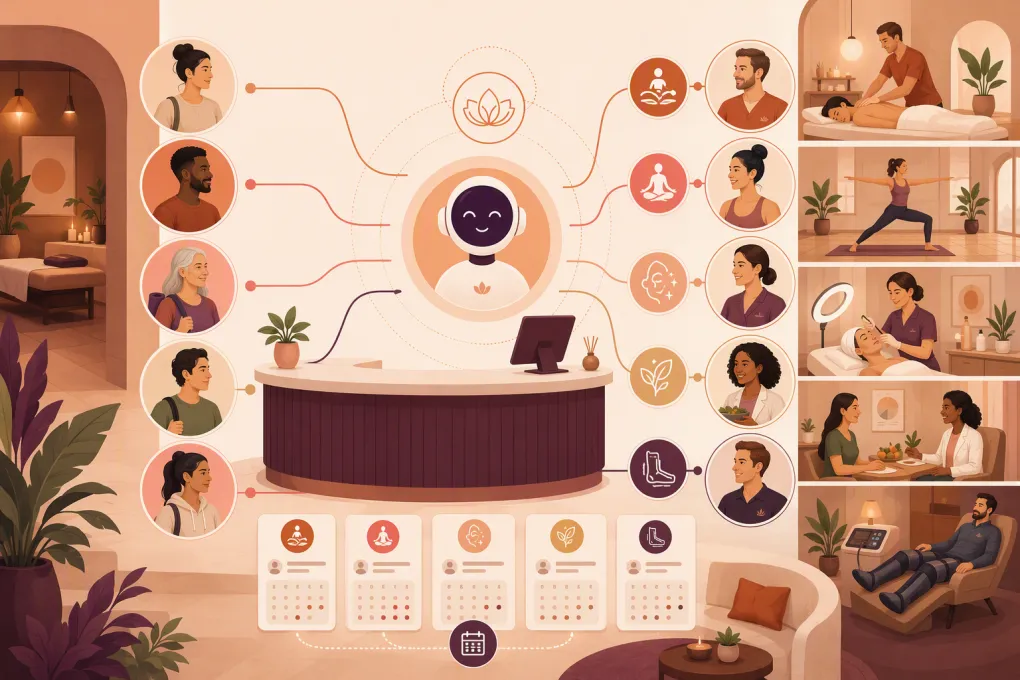 Watch · 20s
A prospective client rarely asks for practitioner matching directly. They say their back feels tight, they want help recovering after training, they need an evening appointment, or they are not sure which service to book. The receptionist’s job is to turn that incomplete request into the right next step.
That gets difficult when a wellness center offers several modalities, practitioners, locations, and appointment types. Front-desk staff must interpret the client’s goal, stay within appropriate boundaries, check availability, explain relevant differences, and secure the booking before the lead moves on.
An AI receptionist for wellness center practitioner matching can handle much of that intake and routing around the clock. But it needs more than a chatbot script. Effective matching depends on structured service data, clear eligibility rules, real scheduling access, and a defined path to a human when the request requires judgment.
See how Fitty can qualify wellness inquiries and move clients toward the right booking →
What practitioner matching actually involves
Practitioner matching is not simply assigning the next available team member. A useful match accounts for several factors at once:
- Client goal: relaxation, mobility, recovery, stress management, skin care, general wellness, or another supported objective
- Service or modality: massage, assisted stretching, acupuncture, yoga therapy, esthetics, nutrition coaching, recovery services, or the center’s other offerings
- Practitioner scope: the services each person is trained, authorized, and scheduled to provide
- Preferences: practitioner gender, communication style, language, accessibility needs, or room requirements
- Availability: desired day, time window, appointment length, and urgency
- Location: preferred branch or willingness to visit another location
- Client status: new client, returning client, package holder, member, or referral
- Administrative requirements: intake forms, deposits, consultation requirements, or age restrictions
A conventional contact form collects some of this information and leaves staff to finish the work later. An AI receptionist can ask relevant follow-up questions in the moment, apply routing rules, and present appropriate booking options without requiring the client to understand the service menu first.
How an AI receptionist should handle the conversation
The strongest workflow follows a controlled sequence rather than allowing an unrestricted AI conversation.
1. Identify the client’s objective
Start with plain language: What would you like help with? Avoid forcing clients to select a modality before they know what it means.
The AI can then ask one or two clarifying questions. For example, someone seeking post-workout recovery may care about soreness, mobility, or relaxation. Those answers can point to different services based on the center’s approved matching rules.
The AI should not diagnose an injury, recommend medical treatment, or imply that a wellness practitioner can address a condition outside their scope. If a client describes warning signs or asks for medical advice, the workflow should stop automatic matching and trigger an appropriate human or emergency guidance path established by the business.
2. Apply service and practitioner rules
Each bookable service should have a structured profile containing:
- Goals the service is intended to support
- Issues the business does not accept or that require review
- Eligible practitioners
- Appointment duration and buffer time
- New-client restrictions
- Required consultations or forms
- Location and room constraints
- Membership, package, deposit, and cancellation rules
Practitioner records should be equally specific. Do not rely on a biography written for marketing. The matching system needs operational fields it can use consistently, such as modalities offered, accepted appointment types, locations, languages, schedule, and whether the practitioner accepts new clients.
3. Check real availability
A match is only useful if the appointment can be booked. The AI receptionist should check the same schedule and constraints used by the front desk rather than promising a time from a separate calendar.
It should account for practitioner availability, room or equipment capacity, appointment buffers, booking lead times, and any limits on online scheduling. If the requested time is unavailable, it can offer nearby times, another qualified practitioner, a different location, or a waitlist when supported by the operation.
4. Explain the recommendation briefly
Clients do not need the center’s full internal decision tree. They need a clear reason for the option presented.
A useful response might explain that a practitioner offers the relevant service, accepts new clients, and has availability in the requested window. It should avoid claims about outcomes or unsupported promises that one practitioner is the best person to treat a condition.
5. Complete the next action
The conversation should end with a concrete step:
- Book the appointment
- Schedule a consultation
- Collect required intake details
- Take an approved deposit or payment
- Join a waitlist
- Request a staff callback
- Send the client a secure form
An AI receptionist that only answers questions still leaves revenue and administrative work sitting in the inbox. The operational value comes from moving the inquiry into the booking workflow.
Build a matching matrix before automating
Automation exposes inconsistent policies quickly. Before configuring AI, create a matching matrix that your staff agrees is accurate.
A basic version can use one row per service and include these columns:
| Matching field | Operational question |
|---|---|
| Client goal | Which plain-language goals can route to this service? |
| Exclusions | Which answers require staff review instead of booking? |
| Eligible practitioners | Who can deliver this exact appointment type? |
| New-client policy | Can a first-time client book directly? |
| Duration | Which appointment lengths may the AI offer? |
| Availability rules | How far ahead or how close to start time can it book? |
| Location constraints | Where is the service actually available? |
| Prerequisites | Is a consultation, form, waiver, or deposit required? |
| Fallback | What happens when no suitable time is available? |
Review this matrix with practitioners and front-desk staff. Practitioners can validate scope and service fit; reception staff can identify the exceptions that occur during real booking conversations.
Keep the first version narrow. Automate common, low-risk matches first, then expand once transcripts and booking outcomes show where clients become confused.
Use WTF Go and Fitty to turn wellness inquiries into qualified, schedulable conversations →
Where AI needs a human handoff
Good automation knows when to stop. Define handoff triggers before launch rather than relying on staff to catch mistakes afterward.
Common triggers include:
- The client asks for diagnosis or medical advice
- Symptoms may require urgent or licensed clinical attention
- No approved service matches the stated need
- The client requests an exception to policy
- A minor, guardian, or consent requirement is involved
- Accessibility needs require manual confirmation
- The client reports a prior adverse experience
- The requested practitioner is unavailable and alternatives are declined
- The AI cannot confidently understand the request
- The conversation involves a complaint, refund, or sensitive issue
The handoff should include the conversation summary, contact details, relevant preferences, and the unresolved question. Making the client repeat the entire exchange defeats the purpose of automated intake.
Set an owner for every handoff queue. A request routed to a general inbox without a response standard is not a completed workflow.
Protect sensitive client information
Wellness businesses vary widely in the type of information they collect. Some operate strictly as consumer wellness providers; others may work with licensed healthcare professionals or handle information subject to additional privacy obligations.
Collect only what is needed to route and book the client. Avoid inviting detailed health histories into ordinary text messages or chat when a secure intake process is more appropriate.
Before deployment, determine:
- What information the AI may request
- Where conversations and intake data are stored
- Which staff members can access them
- How long records are retained
- Whether consent language is required
- Which secure forms should handle sensitive details
- Whether applicable law or contracts require specific safeguards or agreements
Do not assume that labeling a tool as AI, secure, or healthcare-ready answers these questions. The operator remains responsible for understanding the center’s obligations and verifying that each vendor and workflow fits them.
Measure matching quality, not just conversation volume
The number of chats handled does not tell you whether practitioner matching works. Review operational outcomes such as:
- Inquiries that reached a booking or consultation
- Matches overridden by front-desk staff
- Bookings moved to a different service or practitioner
- Conversations that triggered human review
- Unanswered questions and abandoned booking steps
- Double-booking, room, or schedule conflicts
- Intake forms or deposits left incomplete
- Repeat confusion around service descriptions
Read a sample of conversation transcripts regularly. Look for questions the AI asks unnecessarily, language clients misunderstand, and matches that are technically valid but operationally poor.
Also invite practitioner feedback. If one team member repeatedly receives clients whose goals do not fit their services, update the routing rules rather than asking the practitioner to solve the mismatch after arrival.
How Fitty fits the front-desk workflow
Fitty is WTF Go’s AI receptionist and agent for gyms, studios, spas, and wellness businesses. It can answer incoming leads, continue follow-up, support booking workflows, and help collect dues around the clock.
For practitioner matching, the practical opportunity is to connect qualification with action. Instead of leaving a prospect with a service page and a phone number, Fitty can guide the conversation using the business’s approved services and policies, capture the relevant preferences, and move the person toward an eligible appointment or staff handoff.
Because WTF Go is built as an operating system rather than a standalone chat widget, the goal is a cleaner path from inquiry to schedule to ongoing client management. That matters for multi-service and multi-location operators, where fragmented calendars, contact records, and follow-up tools create avoidable front-desk work.
See how Fitty can support practitioner matching, booking, and follow-up for your wellness center →
A practical rollout plan
Start with one high-volume inquiry path rather than every possible service.
- Choose the workflow. Pick a service category with clear eligibility and booking rules.
- Document the matrix. Confirm goals, exclusions, practitioners, prerequisites, and fallback actions.
- Clean the schedule data. Verify appointment types, durations, staff assignments, rooms, and booking limits.
- Write the handoff rules. Name the situations that require staff and assign an owner.
- Test realistic conversations. Include vague requests, unavailable times, returning clients, location changes, and out-of-scope questions.
- Launch with oversight. Review transcripts and booking outcomes frequently during the initial rollout.
- Expand carefully. Add services only after the first workflow routes clients reliably.
The objective is not to make AI sound human at all costs. It is to give each prospective client a fast, accurate, and appropriate route to the right next step—without adding another inbox for staff to monitor.
Frequently asked questions
Can an AI receptionist choose a wellness practitioner for a client?
It can recommend eligible practitioners using approved rules such as service fit, availability, location, language, and client preferences. Requests involving diagnosis, clinical judgment, or unclear needs should be handed to qualified staff.
What information should the AI collect for practitioner matching?
Collect the client’s general goal, preferred service or modality, availability, location, relevant preferences, and any booking prerequisites. Sensitive health details should be limited and moved to an appropriate secure intake process when necessary.
Can an AI receptionist match clients across multiple wellness center locations?
Yes, if it has accurate information about which practitioners, services, rooms, and appointment times are available at each location. It should also confirm whether the client is willing to consider another branch.
Should practitioner matching automatically book the appointment?
For clear, approved matches, direct booking removes unnecessary delay. Complex requests, policy exceptions, medical questions, or uncertain matches should create a structured human handoff instead.
How is Fitty different from a basic wellness website chatbot?
A basic chatbot often answers FAQs and captures contact details. Fitty is designed to support operational actions such as lead response, booking, follow-up, and dues collection within WTF Go’s broader business platform.
Keep reading



Run your gym on autopilot with WTF Go
Fitty — your AI receptionist — answers calls and DMs, fills classes, follows up with every lead, and collects dues while you coach.