AI & Automation
AI Receptionist for Gym Youth Program Enrollment Playbook
Use an AI receptionist for gym youth program enrollment to answer parent questions, capture consent details, book trials, and follow up around the clock.
 Watch · 20s
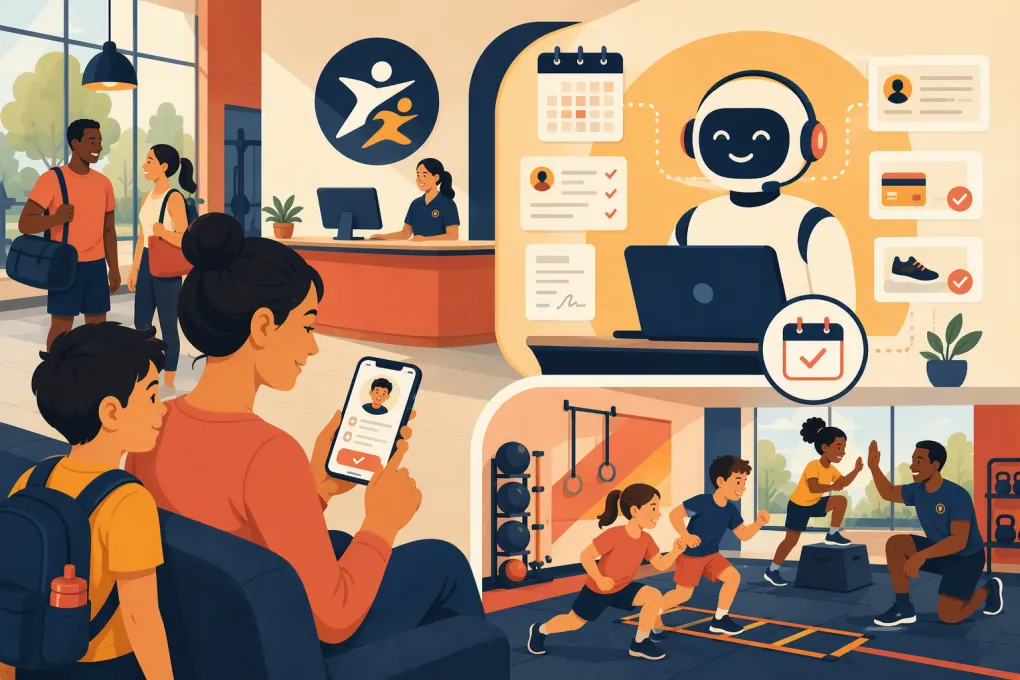
A parent sees your youth strength program after dinner, opens your website, and asks whether the class is appropriate for a 12-year-old beginner. If the answer waits until the front desk reopens, that family may keep searching. An AI receptionist for gym youth program enrollment helps you respond immediately, qualify the inquiry, explain the next step, and move the parent toward a trial or registration.
The goal is not to let a bot make decisions about children. It is to remove the administrative delays between a parent’s first question and a staff-approved enrollment. Used correctly, AI handles repetitive communication while coaches and managers retain control over placement, safety, exceptions, and final approval.
Why youth program inquiries are easy to lose
Youth enrollment involves more friction than a standard adult membership inquiry. Parents often need answers about:
- Age ranges and skill prerequisites
- Class schedules and school-calendar conflicts
- Coach supervision and pickup procedures
- Trial classes or assessments
- Required equipment and clothing
- Parent or guardian participation
- Pricing, billing dates, and cancellation rules
- Waivers, emergency contacts, and health-related forms
These questions frequently arrive while staff are coaching, managing check-ins, or handling the end-of-day rush. A missed call or unanswered form is not just a communication problem. It interrupts the enrollment process before your team has established trust.
An AI receptionist can cover the response gap without forcing coaches to monitor a shared inbox all evening. It can answer approved questions, collect basic lead information, offer eligible booking options, and flag cases that require a person.
See how Fitty handles after-hours youth program inquiries →
What an AI receptionist should actually do
A useful system needs to do more than place a chat bubble on your website. It should advance the enrollment while staying inside clearly defined boundaries.
Answer program questions from an approved knowledge base
Give the AI a controlled source of truth covering each youth program. At minimum, document:
- Program name, age range, and intended experience level
- Current schedule and location
- Capacity or waitlist status
- Trial, assessment, or orientation requirements
- Published fees and billing structure
- Equipment requirements
- Arrival, dismissal, and guardian policies
- Links to official waivers and registration documents
- Situations that must be escalated to staff
Do not make the AI infer policies from scattered web pages or old messages. Assign one employee to maintain the approved answers, especially when schedules change between school terms or seasonal sessions.
Capture the right lead information
The initial conversation should collect enough information to route the family, not every detail needed for final registration. A practical inquiry record includes:
- Parent or guardian name
- Parent’s phone number and email
- Child’s age or birth-year range
- Program of interest
- Preferred location, days, and times
- Prior experience when relevant to placement
- Preferred next step
- Any question requiring staff review
Avoid collecting sensitive information simply because the system can ask for it. Medical history, detailed accessibility needs, custody information, and similar records should go through your approved forms and restricted workflows rather than a general lead conversation.
Book the correct next step
Not every youth lead should be dropped directly into a class. Configure booking rules around how your operation really works:
- Open trial: The parent can select an eligible trial class.
- Assessment required: The AI books an evaluation with an authorized coach.
- Parent orientation required: The AI schedules the orientation before class access.
- Staff approval required: The AI captures availability and creates a follow-up task.
- Program full: The AI offers a waitlist or an approved alternative.
The system should check age, location, schedule, and basic prerequisites before presenting an appointment. Edge cases should be escalated rather than forced through an unsuitable booking path.
Build a parent-friendly enrollment workflow
A strong workflow is short, transparent, and easy to resume. Use the following sequence as a starting point.
1. Respond immediately and identify the goal
Open by confirming the program and asking one useful question. For example:
I can help with the youth boxing program. Are you looking for schedule information, a trial class, or help choosing the right age group?
This is more effective than presenting a long menu or immediately requesting contact details.
2. Establish guardian status
The conversation should be with a parent, legal guardian, or authorized adult. Ask for the adult’s information and keep payment, communication consent, and agreement acceptance attached to that adult’s record.
The AI should never treat a minor’s message as authorization to register, sign waivers, or start billing. If the identity or authority of the person is unclear, route the inquiry to staff.
3. Qualify without interrogating
Ask only questions that determine the next operational step. A beginner-friendly class may require only age, preferred schedule, and experience level. A competitive team evaluation may require additional staff review.
Explain why a question matters. For example: We ask about prior gymnastics experience so the coach can place your child in an appropriate evaluation group.
4. Offer valid times
Only show sessions the lead can actually book. Exclude classes that are full, outside the relevant age band, at the wrong location, or unavailable for trials.
This is where connected scheduling matters. If an AI answers questions but sends every parent to a generic timetable, your team still has to repair the booking manually.
See how WTF Go and Fitty connect conversations, booking, and follow-up →
5. Confirm the booking and explain what happens next
A useful confirmation should include:
- Child’s program and scheduled time
- Facility address and arrival instructions
- What to bring or wear
- Parent attendance requirements
- Links to required forms
- The facility’s contact or rescheduling method
Keep the confirmation operational. Parents should not need to search through a promotional email to find the arrival time.
6. Follow up on incomplete enrollment
Many families pause after asking a question, selecting a time, or opening a form. Build follow-up around the unfinished step:
- Inquiry answered, but no trial booked
- Trial booked, but required form incomplete
- Assessment completed, but registration unfinished
- Payment authorized, but first visit not confirmed
- Program full, but a new opening becomes available
Fitty can answer leads and follow up around the clock, so the conversation does not disappear when the front desk closes. It can also support approved dues collection workflows after the parent or guardian has reached the appropriate enrollment stage.
Use Fitty to follow up with parents before enrollment stalls →
Write messages that reduce parent uncertainty
Youth program communication should sound clear and accountable, not overly casual. Build templates for common moments.
After-hours inquiry
Thanks for contacting us about the youth strength program. I can answer program questions and help schedule the next step. What is your child’s age, and which location are you considering?
Trial confirmation
The trial is scheduled for Tuesday at 5:00 p.m. at our North location. Please arrive 10 minutes early with a parent or guardian. Athletic clothing and closed-toe shoes are required. Complete the linked facility forms before arrival.
Staff escalation
A coach should review that question before we recommend a class. I have recorded your request and contact details for the program team. Your booking is not confirmed until a staff member responds.
Notice that the escalation does not pretend the AI has made a decision. Clear boundaries build more trust than an instant but unreliable answer.
Put safety, privacy, and consent ahead of convenience
Youth enrollment requires tighter controls than ordinary lead capture. Before launch, review the workflow with your legal, insurance, and child-safety advisers. Requirements can vary by jurisdiction, program type, and the information you collect.
Operational guardrails should include:
- Communicate primarily with the parent or guardian.
- Do not let AI provide medical, legal, or developmental advice.
- Keep waivers and policy acceptance in your authorized signing system.
- Obtain appropriate consent for automated calls or texts and honor opt-outs.
- Restrict access to personal information by staff role.
- Set retention and deletion rules for abandoned inquiries.
- Log conversations so managers can review disputed or unclear interactions.
- Escalate injury disclosures, accommodation requests, custody concerns, complaints, and emergencies.
Also define what the AI must never promise. Examples include guaranteed team placement, guaranteed results, individualized medical suitability, or exceptions to pickup and supervision rules.
Measure the enrollment steps that matter
Do not evaluate the system only by counting conversations. Review whether it moves qualified families through the actual enrollment path.
Track:
- Inquiry source and time received
- Time to first useful response
- Percentage of inquiries reaching a booked next step
- Trial or assessment attendance
- Form completion before arrival
- Staff escalations and their resolution time
- Enrollment completion by program and location
- Common unanswered questions
- Cancellations, no-shows, and rescheduling reasons
Review transcripts regularly during the first few weeks and after every major program change. Look for outdated schedules, confusing language, unnecessary questions, and cases where the AI should have escalated sooner.
A practical rollout plan
Start with one program rather than automating every youth offering at once.
- Choose a program with repeatable eligibility and booking rules.
- Document its approved answers, restrictions, and escalation triggers.
- Map the path from inquiry to trial, assessment, or registration.
- Test normal scenarios and difficult edge cases with staff.
- Launch during limited channels or locations if appropriate.
- Review conversations and booking outcomes each week.
- Expand only after the workflow is accurate and maintainable.
The best AI receptionist does not remove your staff from youth enrollment. It gives them cleaner records, fewer repetitive messages, and more time to handle the decisions that require professional judgment. For parents, it creates a faster path from initial interest to a clear, properly managed next step.
Frequently asked questions
Can an AI receptionist enroll a child without a parent?
It should not treat a minor as authorized to sign agreements, approve billing, or complete enrollment. The workflow should identify and communicate with a parent, guardian, or authorized adult.
What information should the AI collect from a youth program lead?
Collect the guardian's contact details, the child's age range, program interest, preferred schedule, relevant experience, and desired next step. Route sensitive or unusual information through approved staff and secure forms.
Can an AI receptionist book youth trial classes automatically?
Yes, when the program has clear age, capacity, location, and prerequisite rules. Assessments, exceptions, and uncertain placement decisions should be escalated to qualified staff.
How should a gym handle forms and payments for youth enrollment?
Send waivers and policy acknowledgments through the gym's authorized signing workflow, with the parent or guardian as the responsible party. Payment should begin only at the approved enrollment stage with clear billing terms and adult authorization.
How does Fitty help with youth program enrollment?
Fitty can answer parent inquiries, help book eligible next steps, follow up on stalled leads, and support approved dues workflows 24/7 while staff retain control over placement and exceptions.
Keep reading



Run your gym on autopilot with WTF Go
Fitty — your AI receptionist — answers calls and DMs, fills classes, follows up with every lead, and collects dues while you coach.