AI & Automation
24/7 Gym Front Desk Automation: A Field Guide for Owners
Learn how 24/7 gym front desk automation handles leads, booking, follow-up, payments, and handoffs without sacrificing member experience or operator control.
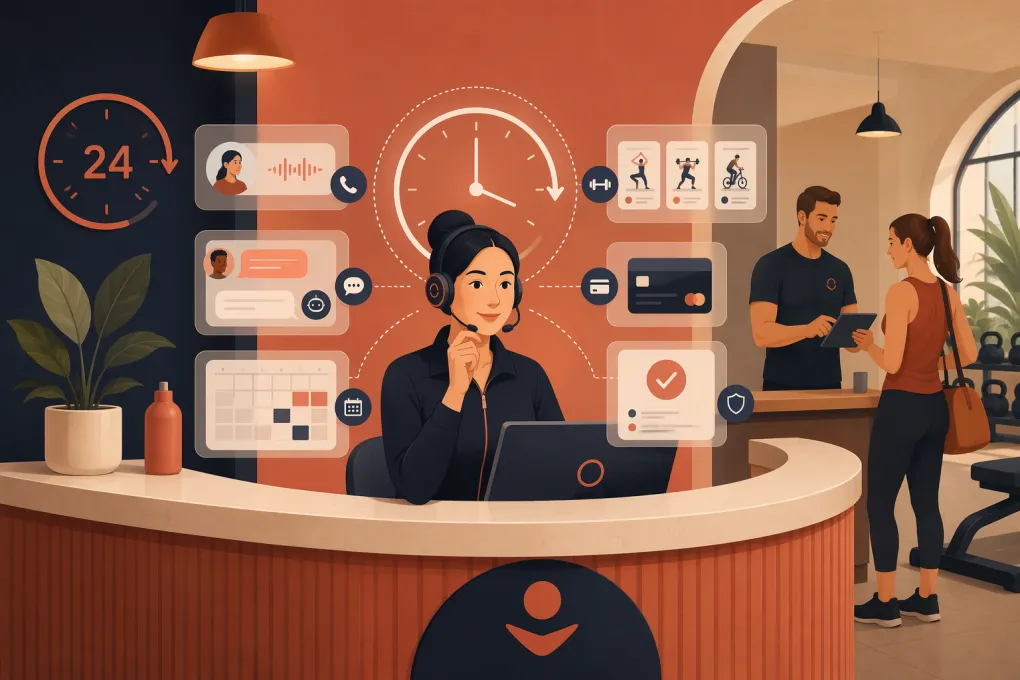 Watch · 20s
A gym does not stop generating front-desk work when the desk is unstaffed. Prospects call after dinner. Members try to change bookings before an early class. Failed payments happen on weekends. If nobody responds, those requests become missed sales, frustrated members, and a larger task list for the opening shift.
24/7 gym front desk automation closes that coverage gap. Done well, it handles routine conversations and transactions immediately while routing exceptions to a person. The goal is not to remove staff from the member experience. It is to stop making staff perform repetitive work that software can complete accurately.
What 24/7 gym front desk automation actually means
Front desk automation connects communication channels with the systems used to run the business. Depending on the setup, it can answer calls or messages, identify what someone needs, retrieve approved information, complete an action, and record the outcome.
A functional system usually touches several areas:
- Lead response: Answering common questions and capturing contact details
- Booking: Scheduling intro visits, consultations, classes, or appointments
- Member service: Handling cancellations, rescheduling, account questions, and policy requests
- Follow-up: Continuing conversations with leads who did not book or attend
- Payments: Sending secure payment links and following up on overdue balances
- Escalation: Passing sensitive, unusual, or high-value conversations to staff
Basic automation follows fixed rules: if a form is submitted, send a text. More capable AI automation can interpret natural language, respond to follow-up questions, and move a conversation toward an approved outcome.
The distinction matters. Sending an instant generic reply is not the same as resolving the request.
The front-desk workflows worth automating first
Start with workflows that are frequent, predictable, and easy to verify. Do not begin with every possible member interaction.
New lead response and qualification
Every inquiry should receive a prompt, relevant response regardless of whether it arrives by web form, text, phone, social campaign, or missed call.
The automation should be able to:
- Identify the service or location the prospect wants.
- Answer approved questions about schedules, amenities, programs, and trial options.
- Ask only the qualification questions needed for the next step.
- Offer available appointment or class times.
- Confirm the booking and explain what to bring or expect.
- Record the conversation in the prospect record.
Avoid turning qualification into an interrogation. A person asking about a beginner class usually needs a clear answer and an easy next step, not a long intake form.
Missed-call recovery
A missed call should trigger a text that acknowledges the call and offers help. The conversation can then continue by text or return to a live call when appropriate.
Configure different handling for:
- New callers versus known members
- Calls during staffed hours versus overnight calls
- Sales questions versus urgent facility issues
- Repeated calls from the same number
Automation should never imply that an emergency is being actively monitored unless that is genuinely true. Facility emergencies, injuries, and safety concerns need explicit instructions and escalation paths.
Class, appointment, and intro booking
Booking automation must use live availability. It should respect instructor capacity, service duration, location, waitlists, membership eligibility, and booking windows.
The confirmation should include the date, time, location, cancellation policy, and any preparation instructions. Reminders should let the member confirm, cancel, or reschedule without calling the desk.
A common operational mistake is automating reminders without automating changes. That still leaves staff processing the replies manually.
Lead nurture and no-show follow-up
Not every prospect books during the first conversation. Automation can follow up after an inquiry, an unfinished booking, or a missed intro appointment.
Useful follow-up is tied to context. It should reference the program discussed and offer a specific next action. It should also stop when the person books, opts out, says no, or needs a staff member.
Do not keep every lead in an endless generic sequence. Define clear exit conditions and review conversations that repeatedly stall.
Failed-payment and past-due outreach
Payment automation can notify members of a failed charge, provide an approved way to update payment details, and confirm when the issue is resolved.
Use a payment processor or secure hosted payment page rather than collecting card details in ordinary text messages or chat. Decide when automation stops and an employee takes over, particularly for disputes, freezes, cancellations, or hardship conversations.
Routine member questions
Automation can resolve questions such as:
- When is the next class?
- Is there space on tonight’s schedule?
- Where should I park?
- How do I update my payment method?
- What is the cancellation policy?
- Can I book at another location?
Answers should come from a maintained source of truth, not improvised responses. Assign an owner for updating hours, policies, program descriptions, and holiday closures.
What should remain human
Automation needs boundaries. A capable system knows when not to continue.
Route conversations to staff when they involve:
- Injuries, medical concerns, or emergencies
- Complaints involving staff conduct or member safety
- Refund disputes and unusual billing adjustments
- Contract interpretation or legal threats
- Accessibility accommodations requiring individual review
- High-value corporate or partnership opportunities
- A person who explicitly asks for a human
- Low-confidence answers or conflicting account information
The handoff should include the caller’s identity, conversation history, requested outcome, and actions already taken. Making the member repeat everything defeats much of the value.
Set ownership rules as well. An escalated billing issue might go to the general manager, while an instructor complaint goes to the location manager. Every queue needs a responsible role and a response expectation.
The operating requirements behind reliable automation
The visible conversation is only one part of the system. Reliability depends on what happens behind it.
One source of truth
Schedules, prices, policies, availability, and account status need authoritative systems. If the website says one thing and the booking platform says another, automation will expose the inconsistency quickly.
Document which platform controls each type of information. Limit manual duplication where possible.
Permission-based communication
Build text and email workflows around appropriate consent, identification, opt-out handling, and applicable quiet-hour requirements. Maintain suppression lists and honor opt-outs across connected campaigns. Because communication requirements can vary by channel and jurisdiction, operators should obtain qualified guidance for their specific setup.
Secure payment handling
Do not place full card details, passwords, or sensitive health information into general conversation logs. Use established payment tools, role-based access, and the minimum data needed to complete the workflow.
Audit trails and review
Operators should be able to see what was asked, what the automation answered, what action it took, and why the conversation was escalated. Review samples from successful and failed interactions. This is how scripts, knowledge, and routing improve.
A practical rollout plan
1. Audit demand before buying tools
Review calls, texts, emails, form submissions, and staff notes. Group requests by intent and identify when they arrive. Look for repeated tasks, missed conversations, and work that requires copying data between systems.
2. Choose two or three workflows
Good starting points are missed-call response, intro booking, and routine schedule questions. They are usually easy to define and have clear outcomes.
Write down the trigger, required information, allowed actions, completion condition, and escalation rule for each workflow.
3. Clean the underlying information
Verify operating hours, staff calendars, service descriptions, location details, policies, and booking rules. Automation cannot compensate for unreliable operational data.
4. Test real conversations
Use the phrases members actually use, including vague requests, spelling errors, multiple questions, and changes of mind. Test known members, unknown prospects, full classes, closed locations, unavailable instructors, and requests outside policy.
5. Launch with supervision
Review conversations daily at first. Track incorrect answers, failed actions, unnecessary handoffs, and cases where the automation should have escalated sooner. Update the workflow rather than coaching staff to work around it.
6. Expand only after the workflow is stable
Once booking and lead response are dependable, consider payment follow-up, win-back outreach, membership reminders, and multi-location routing.
How to judge whether it is working
Do not evaluate front desk automation by message volume alone. Activity is not the same as resolution.
Build an operator scorecard around outcomes such as:
- Leads receiving a response and a clear next step
- Conversations resulting in a completed booking
- Missed calls converted into two-way conversations
- Routine requests completed without staff intervention
- No-shows receiving appropriate follow-up
- Past-due accounts reaching a resolution
- Escalations accepted and resolved by the correct employee
- Incorrect answers or actions requiring repair
- Opt-outs, complaints, and repeated failed interactions
Compare performance by location, channel, workflow, and time of day. Also ask staff what work disappeared and what new work appeared. Poor automation can reduce calls while creating cleanup behind the scenes.
Where Fitty fits
Fitty is WTF Go’s AI receptionist and agent for gyms, studios, spas, and wellness businesses. It is designed to answer leads, book classes and appointments, continue follow-up, and assist with dues collection around the clock.
Its practical role is to connect conversations with operational actions rather than functioning as a stand-alone website chatbot. For an operator evaluating Fitty or another platform, the same test applies: can it complete the workflow in your real systems, preserve context, and hand exceptions to the right person?
A useful evaluation should include your actual schedules, policies, locations, lead sources, and edge cases. A polished demo is less important than dependable behavior under ordinary front-desk conditions.
The standard to aim for
Good 24/7 gym front desk automation is not measured by how human the software sounds. It is measured by whether prospects and members get accurate answers, completed actions, and a clean path to staff when judgment is required.
Start with high-volume workflows, establish firm boundaries, and review the results. The strongest setup gives members faster service while giving employees more time for coaching, sales conversations, and problems that genuinely need a person.
Frequently asked questions
Can 24/7 gym front desk automation answer phone calls as well as texts?
Some platforms support voice, text, web chat, and email, while others cover only selected channels. Confirm that the system can preserve conversation context and complete actions across the channels your members actually use.
Will an AI gym receptionist replace front desk employees?
It is better used to handle repetitive requests and after-hours coverage. Staff should remain responsible for sensitive complaints, complex billing issues, safety concerns, and interactions requiring judgment.
What should a gym automate first?
Start with missed-call recovery, new-lead response, intro booking, and common schedule questions. These workflows are frequent, measurable, and easier to define than complex account exceptions.
How do gyms prevent automated responses from giving incorrect information?
Use maintained sources for schedules and policies, restrict the actions automation may take, set confidence-based escalation rules, and review conversation logs regularly. Test edge cases before expanding the system.
Can front desk automation collect overdue gym dues?
It can send reminders, provide secure payment links, and follow up on failed payments. Disputes, hardship requests, refunds, and unusual account changes should be routed to authorized staff.
Keep reading



Run your gym on autopilot with WTF Go
Fitty — your AI receptionist — answers calls and DMs, fills classes, follows up with every lead, and collects dues while you coach.